Link copied!
AI
A free browser-based 3D trainer for learning Arduino, no hardware required

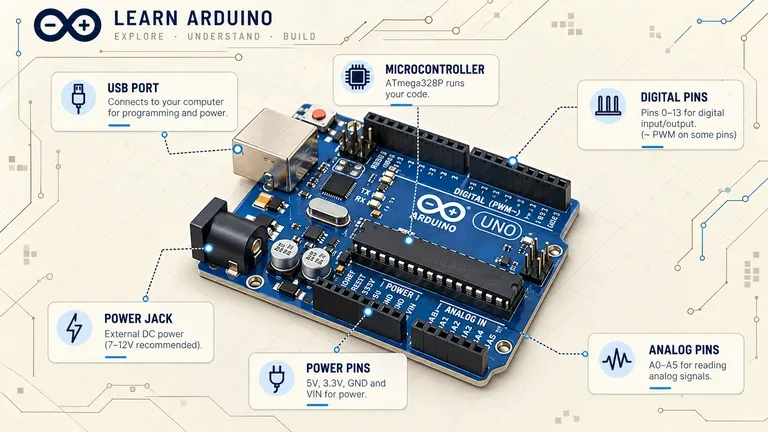
Designer and creative coder Dilum Sanjaya has released Learn Arduino, an interactive site that lets beginners rotate a 3D board model, work through pinout and spec tabs, and test code in a built-in simulator, all without installing anything or buying a single wire.
What’s actually on the site
Learn Arduino is built around four sections: Lessons, Components, Simulator, and Settings. Lessons are organized into categories, and the first one, Basics, holds 11 lessons tracked with a progress counter that starts at 0 of 11. Each lesson is broken into four tabs, Overview, Pinout, Example, and Specifications, so the content works through a board’s actual pin layout and technical specs rather than staying purely conceptual.
Browser 3D instead of a flat circuit diagram
The standout feature is the 3D navigation built directly into the browser. You can drag or use WASD to pan around a board model, Q and E to rotate it, and scroll to zoom in on specific pins or components. The Simulator section pairs a Run simulation button with a serial monitor, so code output can be checked in something close to the real Arduino workflow, write code, run it, read the output, minus the physical board and wiring.
The site loads without a login wall or paywall, so it functions as a freely accessible teaching tool rather than a subscription product. It’s the work of Dilum Sanjaya, a designer and creative coder who posts demos built on newly released tools and models to his 67,000 X followers; Learn Arduino reads as one of those side projects rather than a funded product launch. The exact list of components covered and the full lesson roster beyond the Basics category aren’t shown publicly on the site, so take the 11-lesson count as what’s confirmed, not a ceiling.
Browser-based Arduino simulation isn’t new on its own, tools like Wokwi and a handful of open-source JavaScript simulators already let people wire up virtual boards without buying hardware. What sets Learn Arduino apart from that crowd, at least based on what’s visible on the page, is the 3D-first presentation: instead of a flat circuit diagram, beginners get a model they can rotate and zoom into pin by pin, paired with pinout and spec tabs that match the physical board rather than an abstracted schematic. For someone who’s never touched a breadboard, that framing lowers the gap between reading about a board and actually recognizing one.
“
“Rotating a board model pin by pin closes a gap flat diagrams never could, between reading about hardware and recognizing it.”

Related tags






Share
SUBSCRIBE TO OUR PRIVATE CASES AND USEFUL TIPS
Subscribe to our newsletter, get only exclusive content and weekly digests, no any spam!
By providing my email, I accept the Privacy Policy.